RSCOM
RSCOM Interventions

The field app that saves time for your technicians… and your invoicing.

Service reports signed on a tablet, work and travel time calculated automatically, service files, AI assistant, live team tracking, leave and scheduling — all connected to your Odoo ERP and secured end to end.

✔ Windows   ✔ Android (tablets and smartphones)   ◌ macOS / iOS in preparation

Live team
👷 Technician A · TabletOn site
🚐 Technician B · PhoneDriving
☕ Technician C · TabletOn break
💻 Office · Windows PCFinished
Report #1284 signed and sent to the customer✓ Odoo
1 appfor the field and the office
0 paperPDF reports signed on screen
Real timeteam statuses and locations
Odootasks, hours, attendance and leave in sync
Demo

The app on video

Recorded on a Samsung Galaxy Tab with a demo customer (French interface, English captions, real data blurred): a call logged in seconds, official address suggested, travel and labour timed, AI-written report, signatures and PDF report, AI-prepared quote, job board, team chat, GPS tracking, accounts, permissions and action log.

The full demo (2 min 30)
What's new, October 2026 (1 min 30)
Office and van stock, expenses read by AI, time billing, two-factor authentication, delete permissions and forgotten working days.
Features

The whole service call, in a single app

From arriving at the customer's site to invoicing: every step is entered once, in the right place, and passed on automatically.

📝

Service reports

  • Customer, contact, address, description
  • Customer and technician signatures
  • Photos and attachments
  • Voice-dictated summary
  • Professional PDF emailed automatically
✨

AI assistant

  • Customer report written from quick notes
  • Service file created from the customer's email
  • Always a suggestion: nothing is sent without review
  • Only technical notes are shared (no names, addresses or prices)
💼

AI-assisted quotes

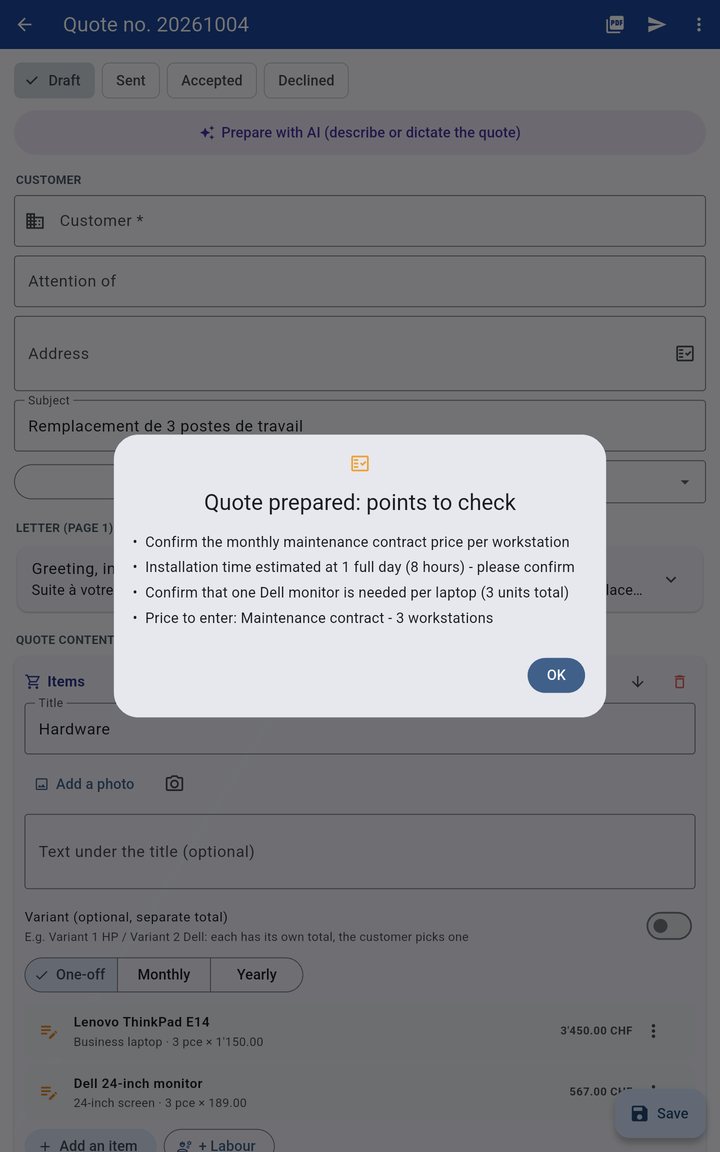
  • Describe or dictate the quote: items, prices and labour prepared
  • Odoo catalogue, templates, variants, monthly or yearly prices
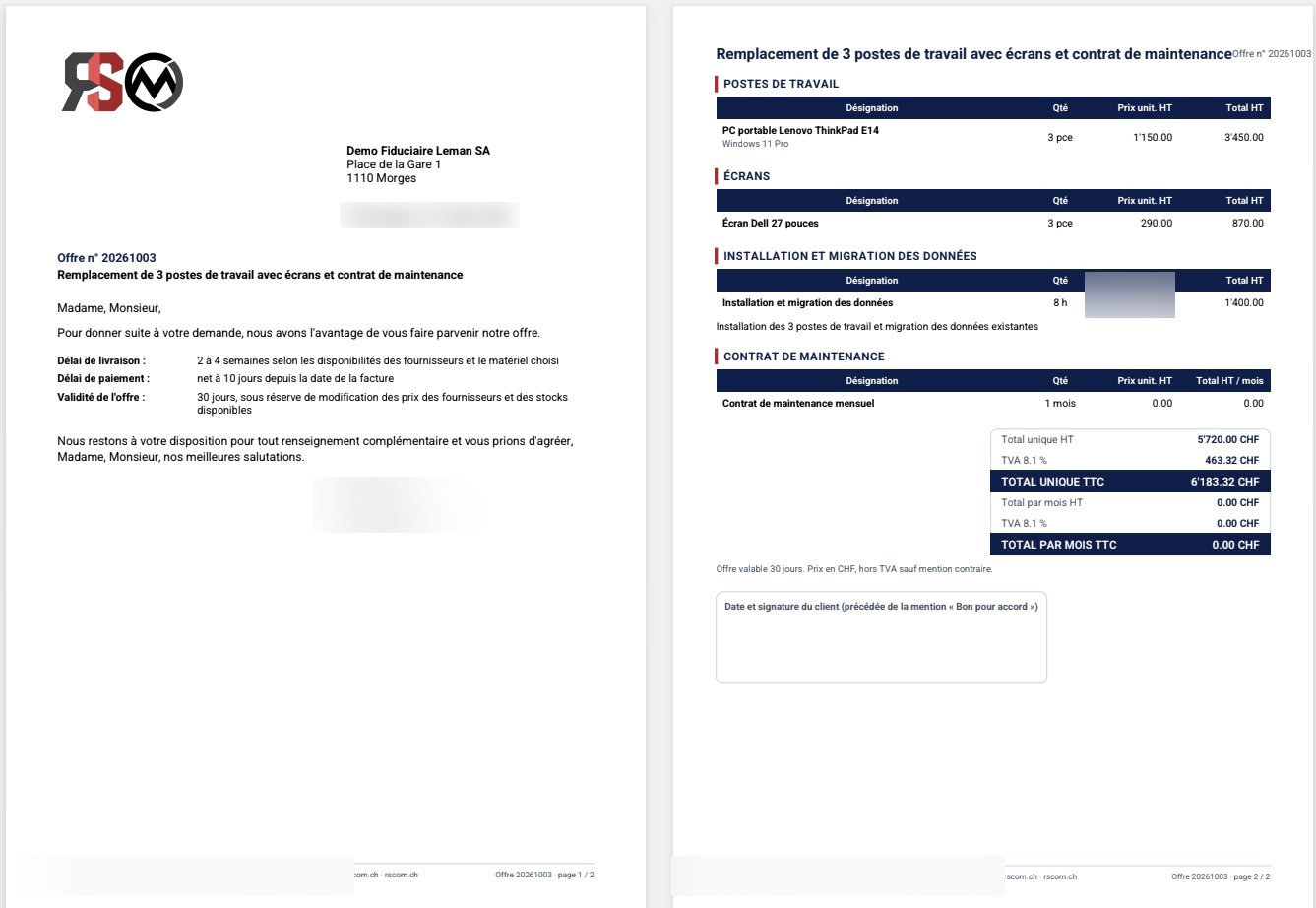
  • PDF on your letterhead, sent by e-mail, online signature
  • Accepted quote → Odoo sales order
  • Quote items reused in the service report
  • Quotes fully dictated by voice: customer recognised automatically
📞

Calls & customers

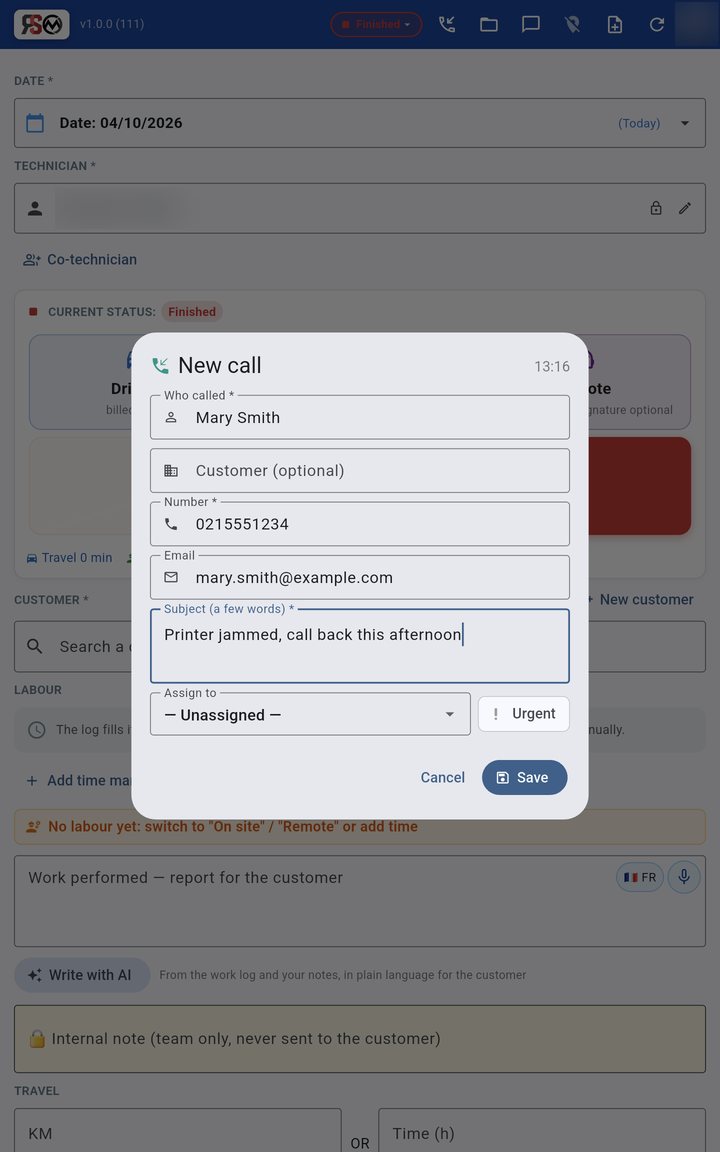
  • "New call": job file created in seconds
  • Customer recognised by number or e-mail (duplicates flagged)
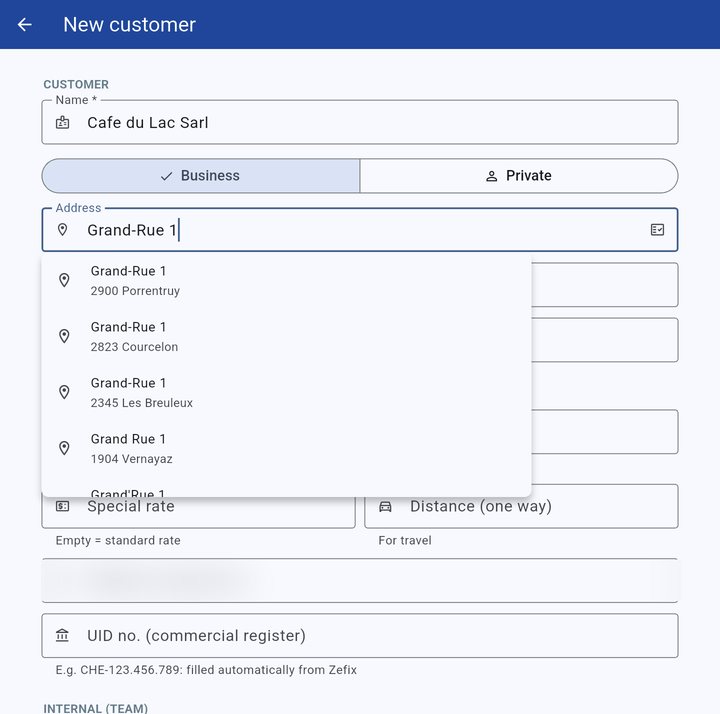
  • Official Swiss addresses suggested as you type
  • Commercial register (Zefix) and search.ch directory
  • Assets, warranties, licences and renewals per customer
  • Former customers archived: out of searches, history kept
  • Duplicates detected and merged in one click
🛡️

Roles & audit trail

  • Super Admin, Admin and Technician
  • Per-menu permissions, enforced by the server
  • Delete or archive: a permission ticked per account
  • Action log and sign-in log
  • Devices approved one by one
  • Action log exported (Excel) or sent by e-mail
📁

Service files

  • To do → In progress → Done → Invoiced
  • Request, requester, due date, assigned technician
  • Editable categories and types (billable or not)
  • Time spent added automatically by each report
  • Multi-word search, keyboard shortcuts on PC
⏱️

Automatic time & travel

  • Field: Driving, On site · Office: Remote
  • Work log by quarter hour, filled in by the statuses
  • Several technicians: labour multiplied, travel counted once
  • Timesheets per technician in Odoo
  • Everything resets for the next job
🔗

Odoo integration

  • Service tasks created automatically
  • Attendance clock-in / clock-out (hr.attendance)
  • Timesheets per employee
  • Leave, allocations and leave types
  • Public holidays (Swiss, per canton)
  • Server-side connection: no keys in the app
🗺️

GPS tracking (app and web)

  • Live fleet, per technician and per device
  • Trip history colour-coded by status
  • Detected stops, distance, time per status
  • Alerts: signal lost, low battery
  • Official addresses, PDF / Excel export
  • Full address of every position (official register)
🌴

Leave & scheduling

  • “My leave”: balances and requests
  • Approval by the administrator
  • Monthly and yearly team schedule
  • Team view without leave reasons (privacy)
  • Viewing rights per employee
🔐

Customer credentials vault

  • Customer passwords and access details (KeePass format)
  • AES-256 encryption with a master password
  • Available on site, no paper
  • Nothing readable without the master password
👥

Simple administration

  • A personal account per technician
  • Super Admin, Admin and Technician roles
  • Business / private / travel rates, net or gross, VAT and rounding
  • Business or private category and special rate per customer
  • Instant account deactivation
🔄

Automatic updates

  • New version offered at start-up
  • Integrity check (SHA-256)
  • Windows and Android, no app store needed
  • “Check for updates” button in the profile
  • Direct tablet installation over USB
🕒

Attendance & time clock

  • Statuses clock arrival, breaks and departure
  • RFID badge at the office (Odoo kiosk)
  • A single register: Odoo Attendances
  • Forgotten “Finished”: reminder at 8 h and 9 h, e-mail to the manager
  • Compliant with Swiss working-time recording
💬

Team messaging

  • Office ↔ technicians, in real time
  • Urgent messages with read receipts
  • From the dashboard or the app
  • Linked to the customer concerned
  • No more customer data on private WhatsApp
🧠

Customer memory

  • Internal info per customer (never on reports)
  • Internal note per service call
  • Full service history
  • Search by word, device or serial number
  • Arrival notice to the customer by email (estimated time)
📶

Built for the field

  • Remote support: “Remote” status, no GPS and no signature required
  • Full-screen mode on tablets
  • Data cached for offline use
  • Reliable tracking even with the screen off (Android)
  • English, French or Portuguese interface (each user chooses)
📦

Office and van stock

  • Items and quantities per location (office, each van)
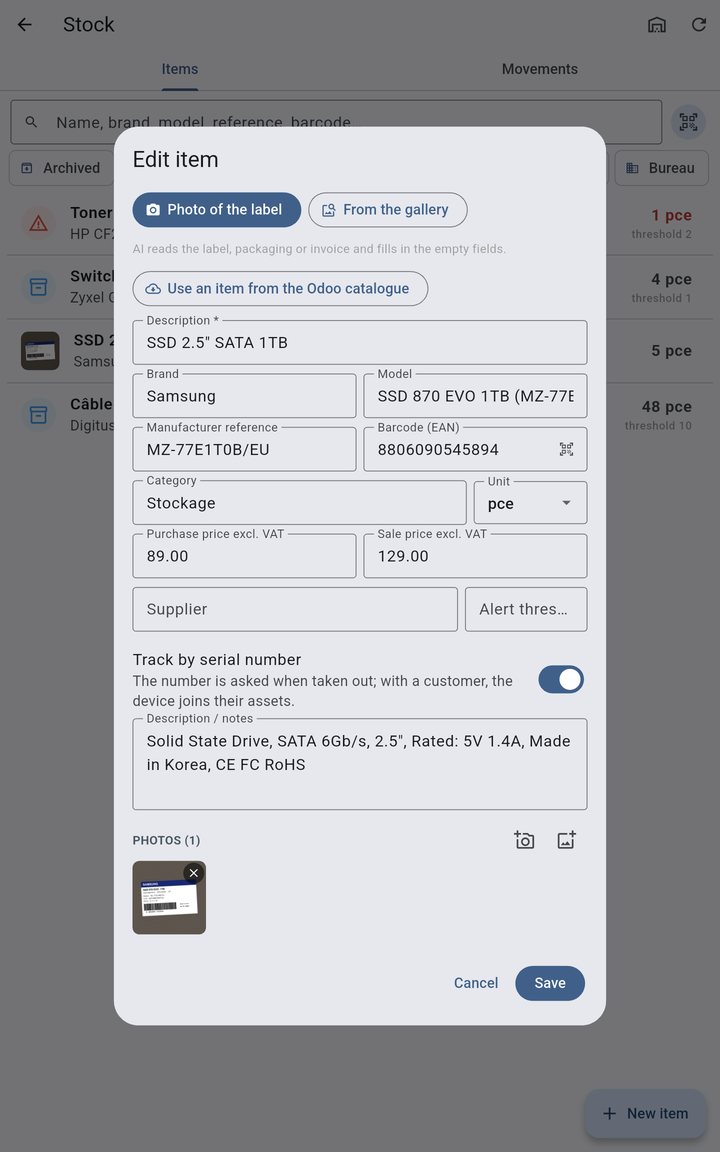
  • Photo of the label: AI fills in brand, model, reference
  • Barcode scanning, item photos
  • Automatic stock-out when the report is saved
  • With a serial number: the device joins the customer's inventory
  • Size and colour; brand, category and colour filters
🧾

Expenses

  • Photo of the receipt: amount, VAT, date and merchant read by AI
  • Parking, fuel, postage…: categories taken from Odoo
  • Sent to Odoo Expenses with the photo
  • Re-invoiced to the customer on the same report, if wanted
  • Paid by the employee or with the company card
💶

Time billing

  • Rounding to the quarter hour with tolerance, adjustable
  • Small jobs free below a threshold, with confirmation
  • Each report: billable, non-billable or to be decided
  • “To be decided” list for the manager, then sent to Odoo
  • Real and billed time shown on the PDF
📱

SMS and WhatsApp

  • Arrival notice with tracking link
  • SMS on behalf of the company, sender of your choice
  • Free WhatsApp, message already written
  • Allowed countries and daily limit
  • Exportable history (CSV, e-mail)
🛡️

Manufacturer warranties

  • Each customer's inventory: hardware, licences, Care Packs
  • Due date calculated (purchase + duration)
  • HP / HPE checks in batches of 20
  • Ready for the HP and Lenovo APIs
  • Filters by customer and brand, e-mail alerts
  • Warranty type: Onsite NBD, Depot, ADP, KYD…
📷

Customer photos and videos

  • Secure link sent by SMS, WhatsApp or e-mail
  • No account or app needed for the customer
  • Photos, videos and PDFs, up to 2 GB per file
  • Files stored straight in the service file
  • Time-limited link, private storage in Switzerland
The app in pictures

Real screenshots, taken on a Samsung Galaxy Tab

No mock-ups: this is the app exactly as our technicians use it every day, here with its English interface. Customer and technician names, GPS positions and rates have been blurred.
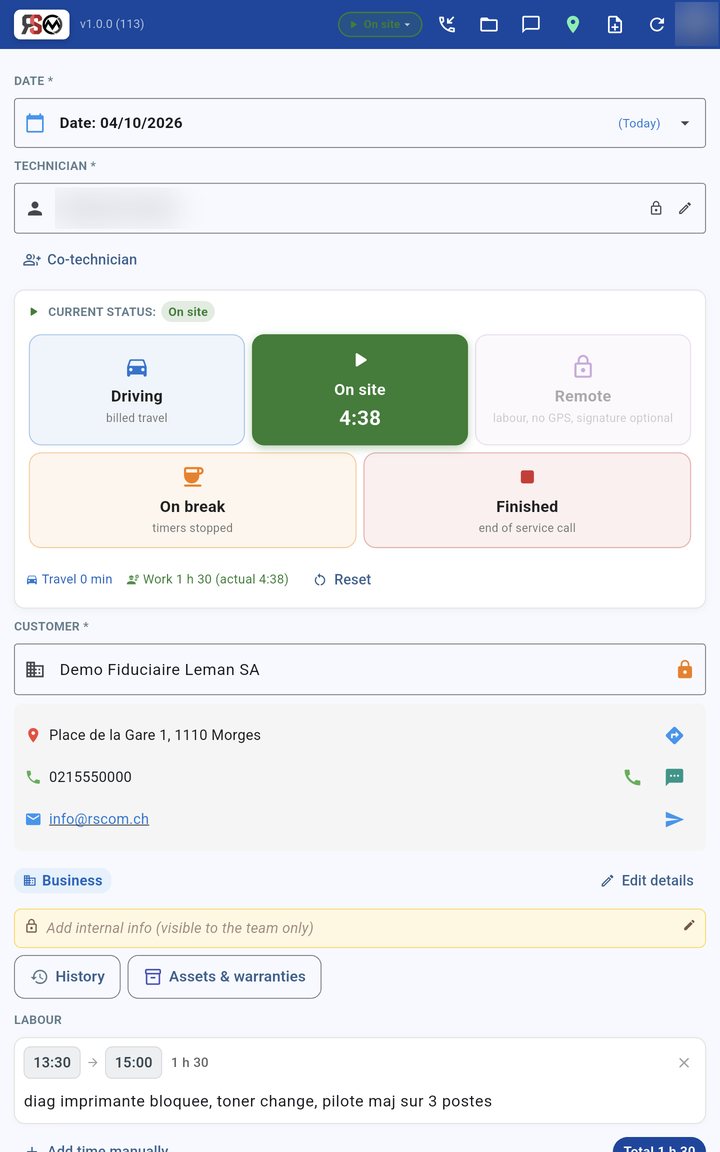
Field and office statuses, co-technician and customer card
Field or office, in one tapGrouped statuses with a short explanation; a colleague added as co-technician; customer card with its business or private rate.
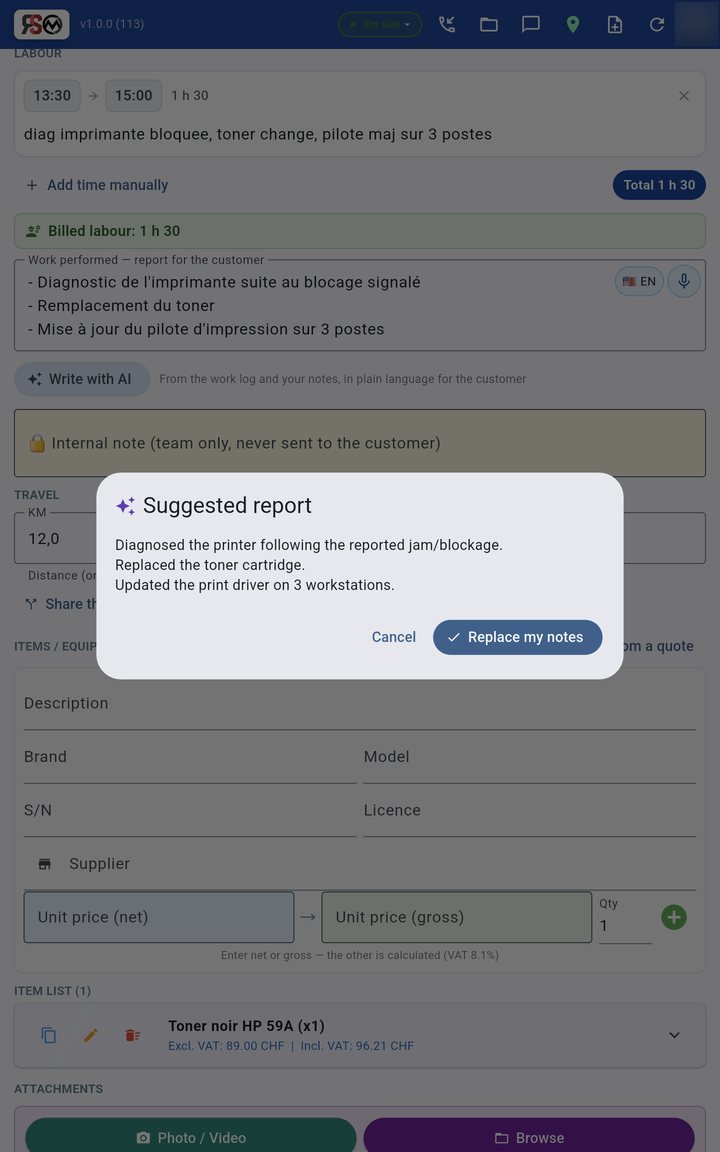
Work log and AI-drafted report
Work log & AIHours are logged by quarter hour on their own; the technician types a few words and the AI writes a clean report for the customer.
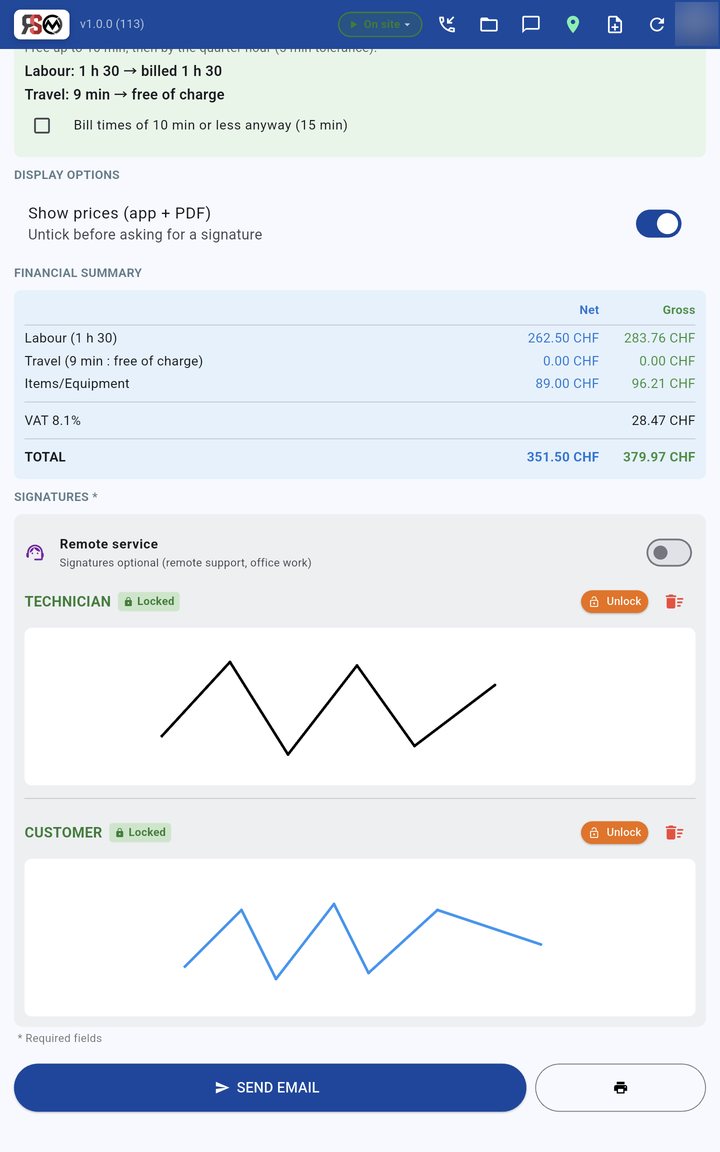
Financial summary and signatures
Totals & signaturesNet / VAT / gross summary calculated automatically, signatures locked, sent by email. Signature optional for remote work.

Service files: from the customer's request to invoicing

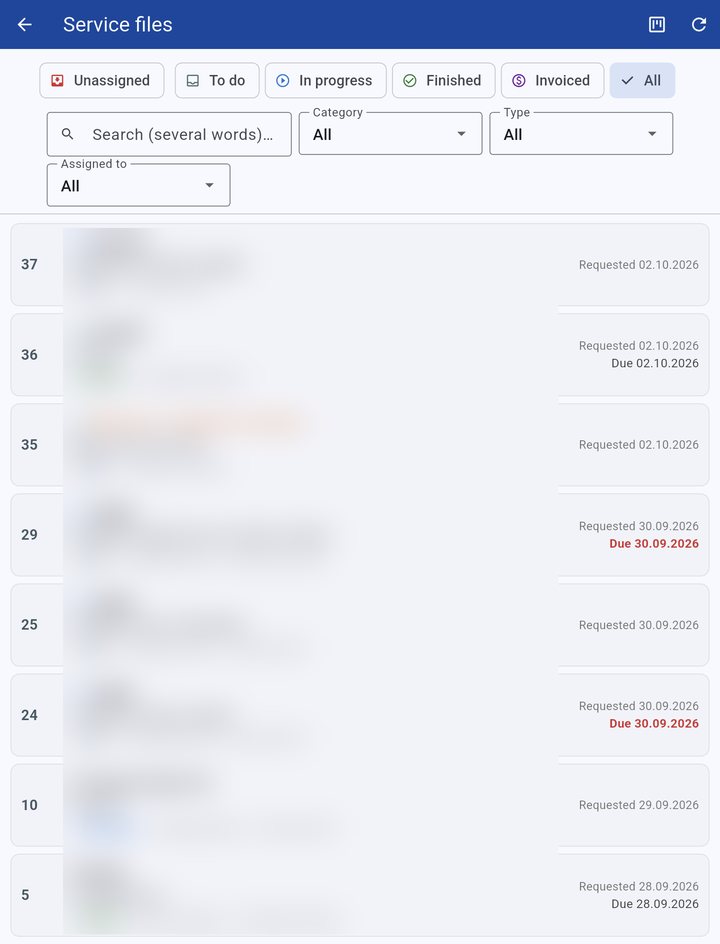
List of service files
Every file, filtered in one clickTo do, in progress, done, invoiced; by category, type or technician; multi-word search.
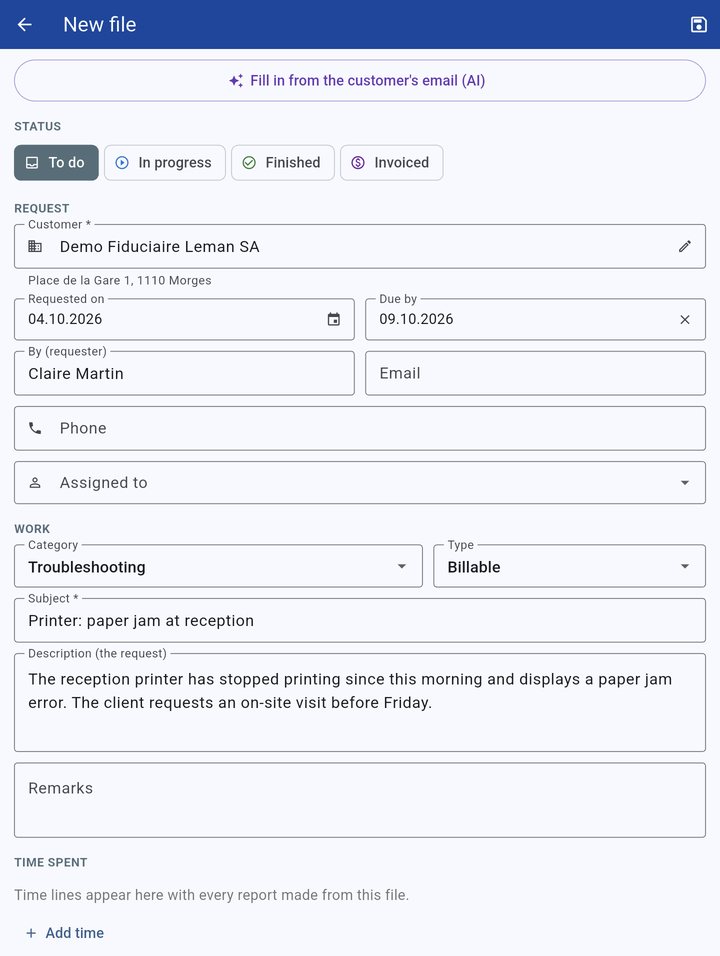
Service file filled in by the AI from the customer's email
Created from the customer's emailPaste the email: the AI suggests the subject, description, requester, category and requested date.
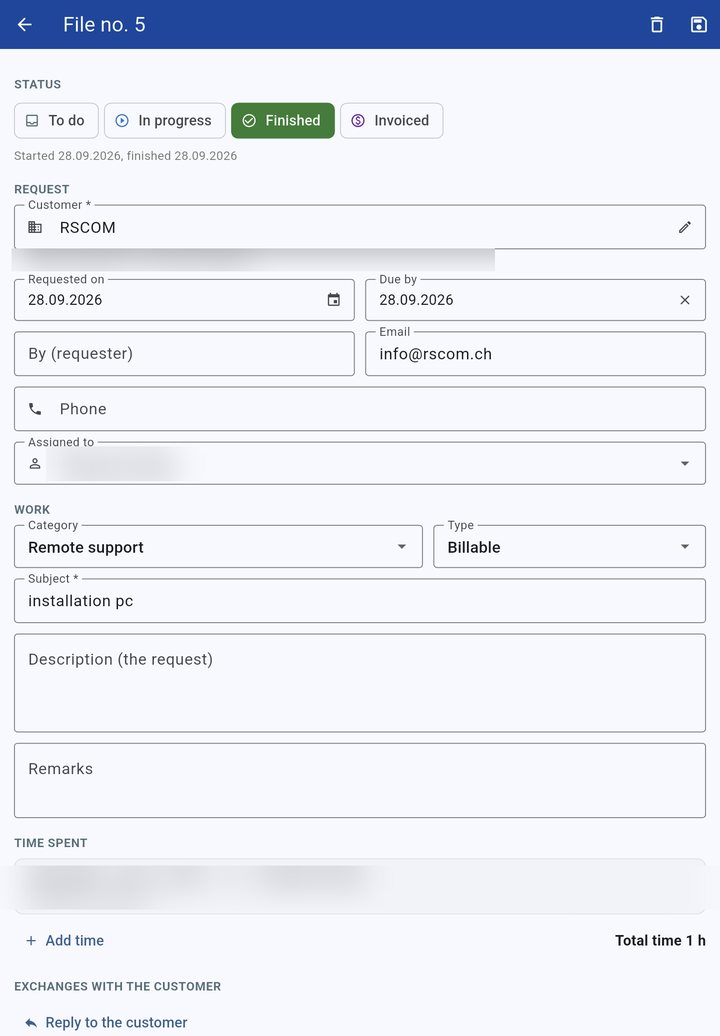
Service file with time spent
Time spent, no re-typingEach report adds its hours to the file, per technician; the total is calculated automatically.

Calls, customers and quotes

New call
A call? 20 secondsWho called, the customer if known, number, e-mail, subject: the service file is created and the technician notified.
Official Swiss addresses
Error-free addressesOfficial Swiss addresses (geo.admin.ch) are suggested as you type; the commercial register (Zefix) fills in the name and UID.
Quote prepared by AI
Dictate it, it's readyA few words or dictation: the AI prepares items, prices and labour — and flags what needs checking.
PDF offer
The offer your customer receivesLetter on your letterhead, item blocks, variants, one-off or monthly prices, online signature available.
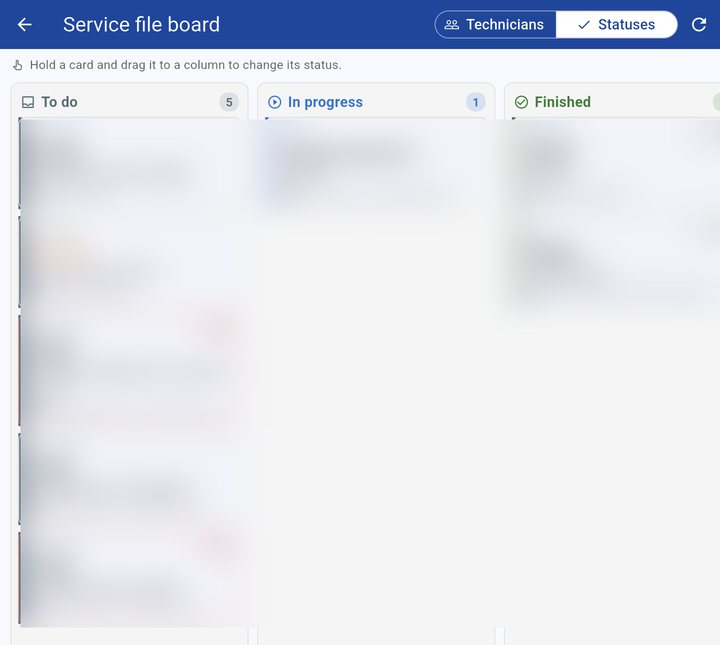
Job board
Job boardDrag a card to change its status or assign it to a technician, who is notified at once.

Stock, expenses and time billing

An item from one photo
An item from one photoPhoto of the label: AI fills in brand, model, reference and barcode; opening stock per location.
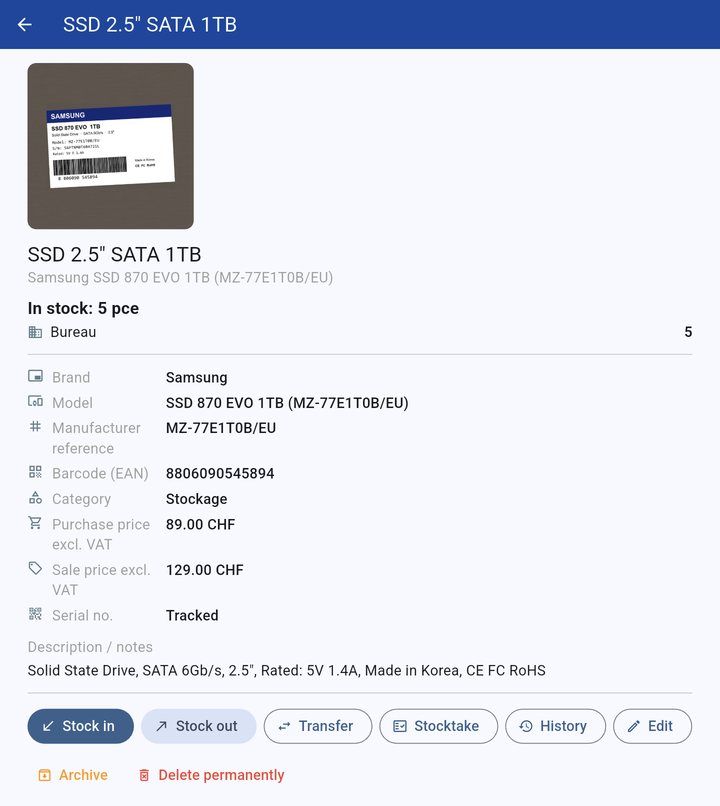
Item sheet
Item sheetPhotos, quantity per location (office, vans), stock in and out, transfers, stocktake and history.
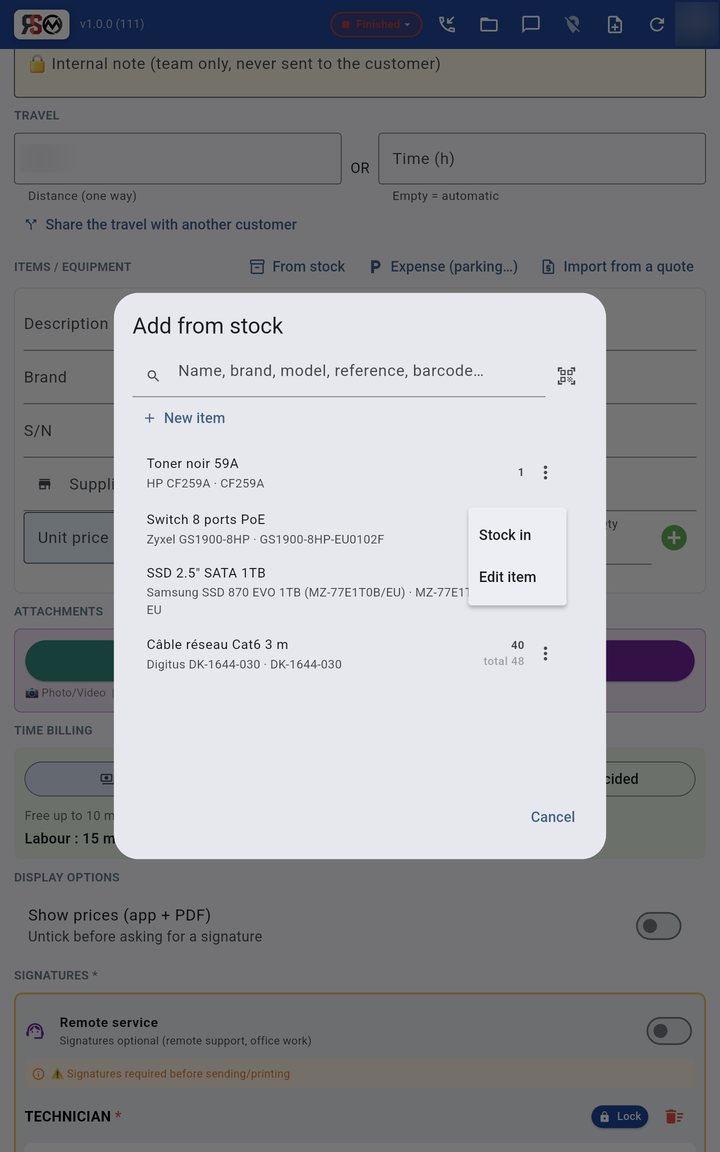
From the report
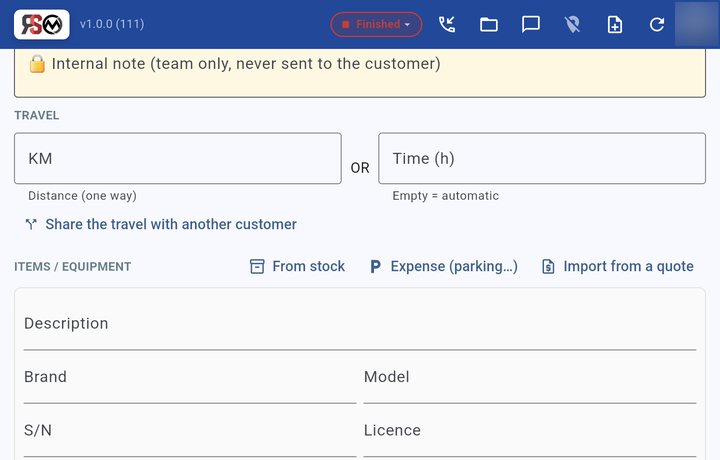
From the reportInstalled hardware is taken from stock and booked out automatically; stock in or edit an item without leaving the report.
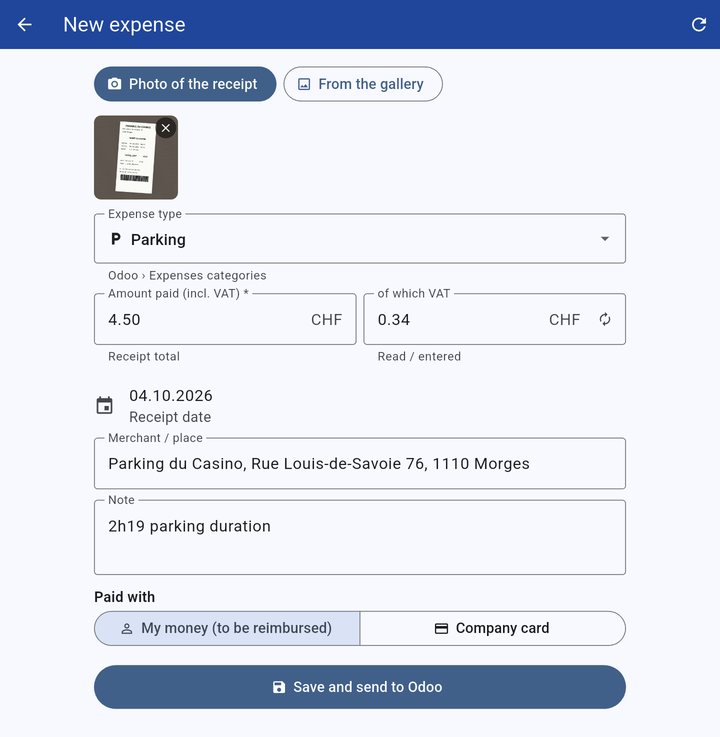
Expenses read by AI
Expenses read by AIPhoto of the receipt: amount, VAT, date and place filled in; paid personally or with the company card, sent to Odoo Expenses.
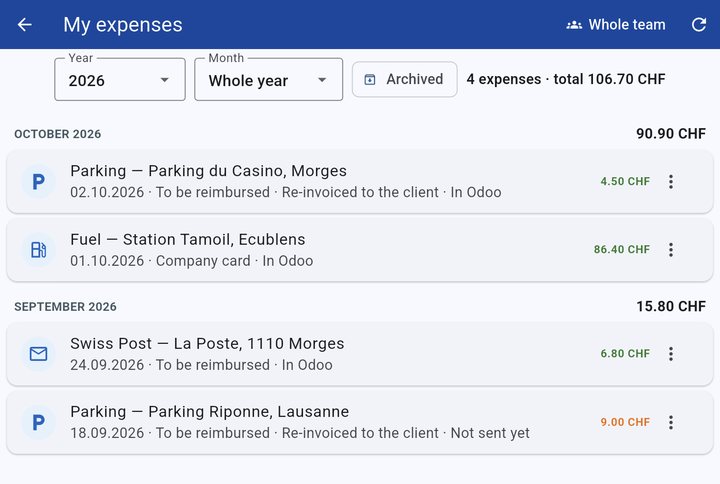
My expenses
My expensesBy year and month, with their Odoo state; a re-invoiced expense appears on the customer’s report.
Time billing
Time billingEach report is billable, non-billable or to be decided; a manager settles it later, before it is sent to Odoo.

Administration, roles and audit trail

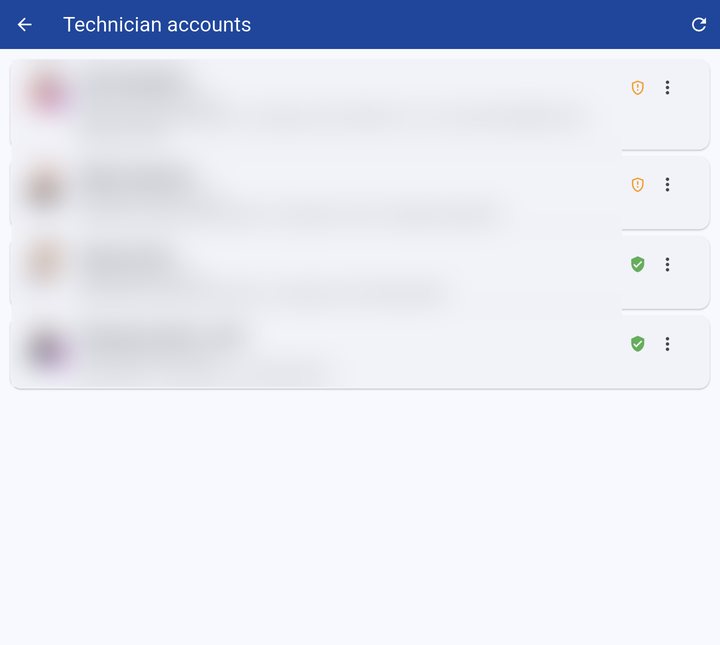
Technician accounts
Accounts & rolesSuper Admin, Admin, Technician; everyone’s photo; the green shield shows two-factor authentication is active.
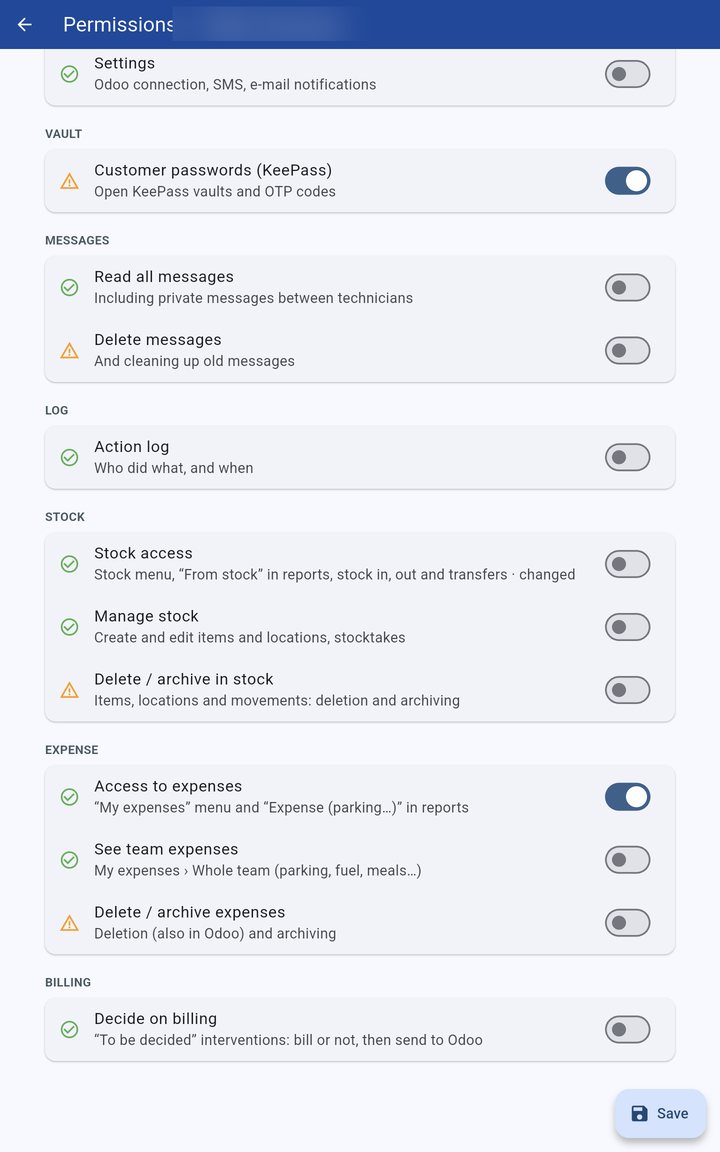
Per-menu permissions
Per-menu permissionsOne switch per right, enforced by the server. Deleting or archiving (stock, expenses, assets, service files…) is a separate switch, off by default.
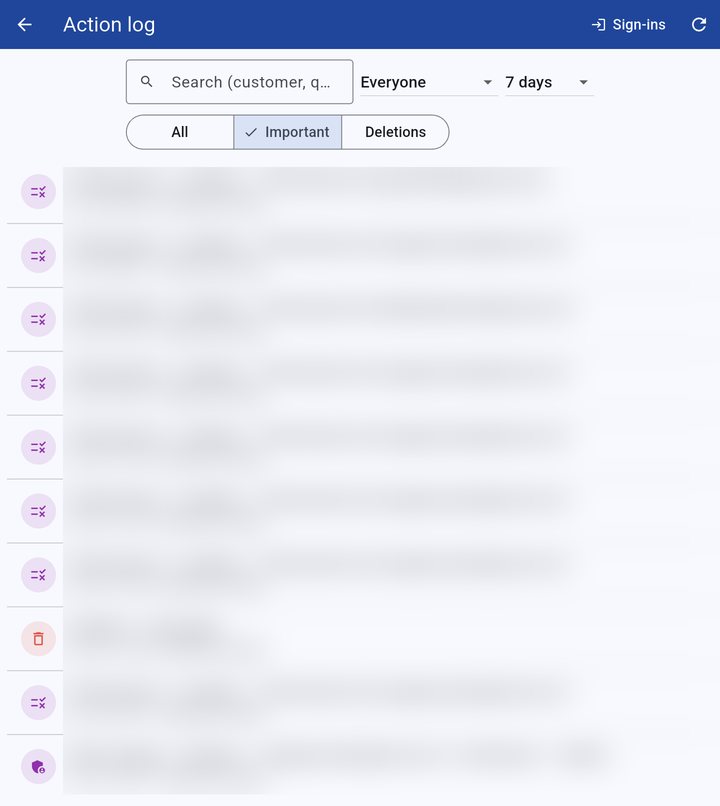
Action log
Action logWho created, changed, deleted or sent what, and when — filters by person, period and deletions.

Security and forgotten working days

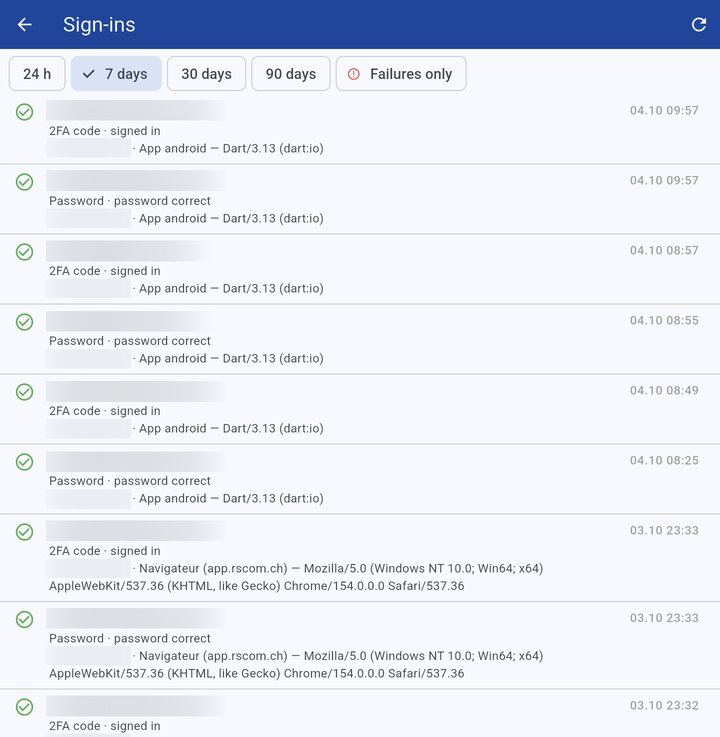
Sign-in log
Sign-in logEvery sign-in attempt, with two-factor authentication; 5 failures: account locked and e-mail alert.
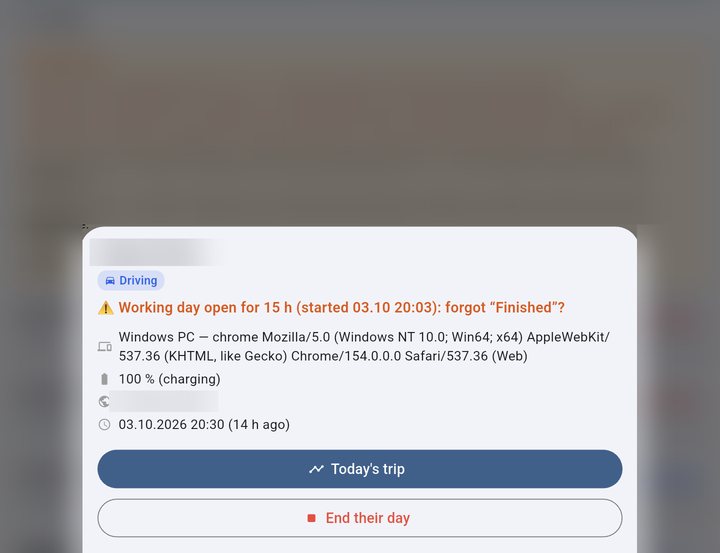
Forgot “Finished”
Forgot “Finished”Reminder to the technician at 8 h and 9 h; beyond that, an e-mail to administrators, who can end the day themselves.
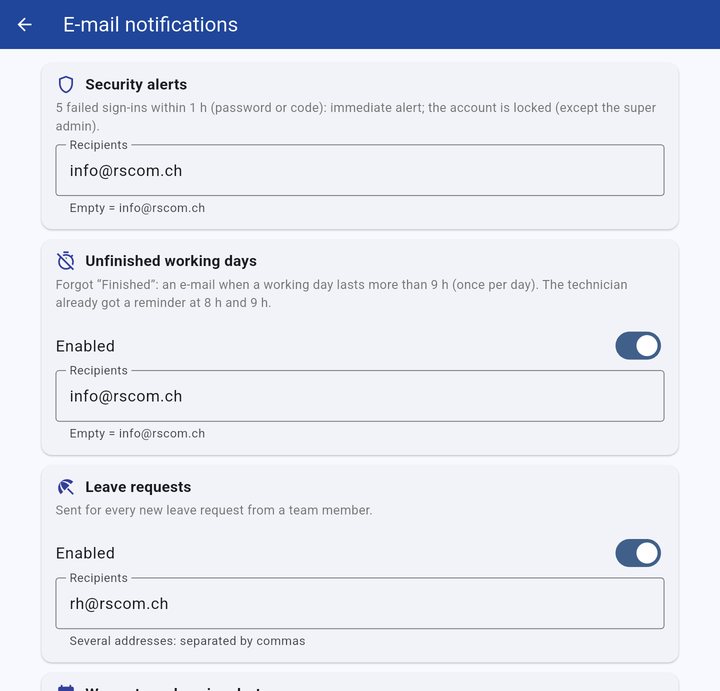
E-mail alerts
E-mail alertsChoose who receives security alerts, unfinished working days, leave requests and expiry reminders.

Personal menu, profile and settings

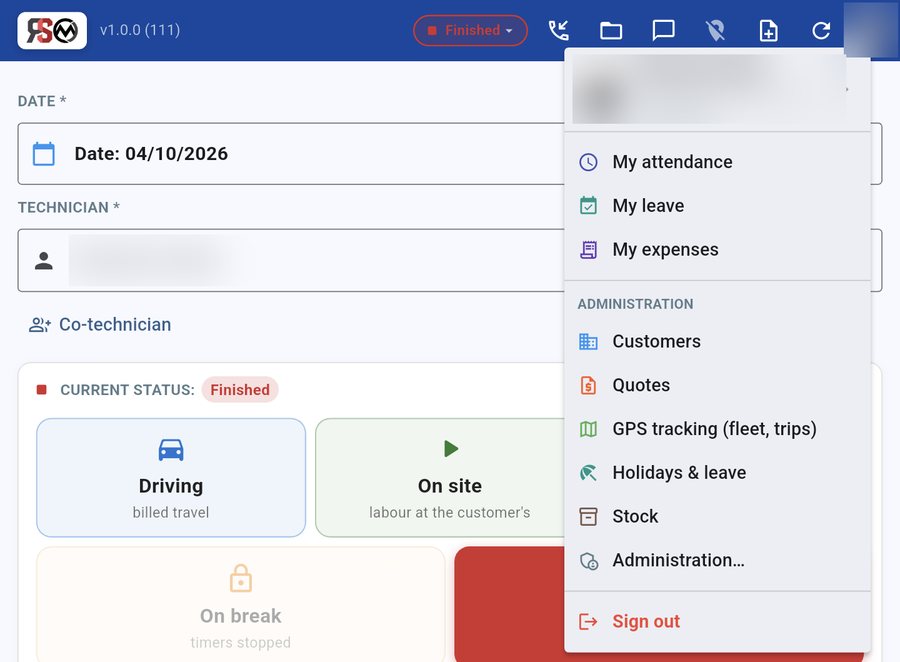
Personal menu under the profile picture
Everything under the profile photoAttendance, leave, expenses and, for administrators, customers, quotes, GPS, stock and settings: one menu, always in the same place.
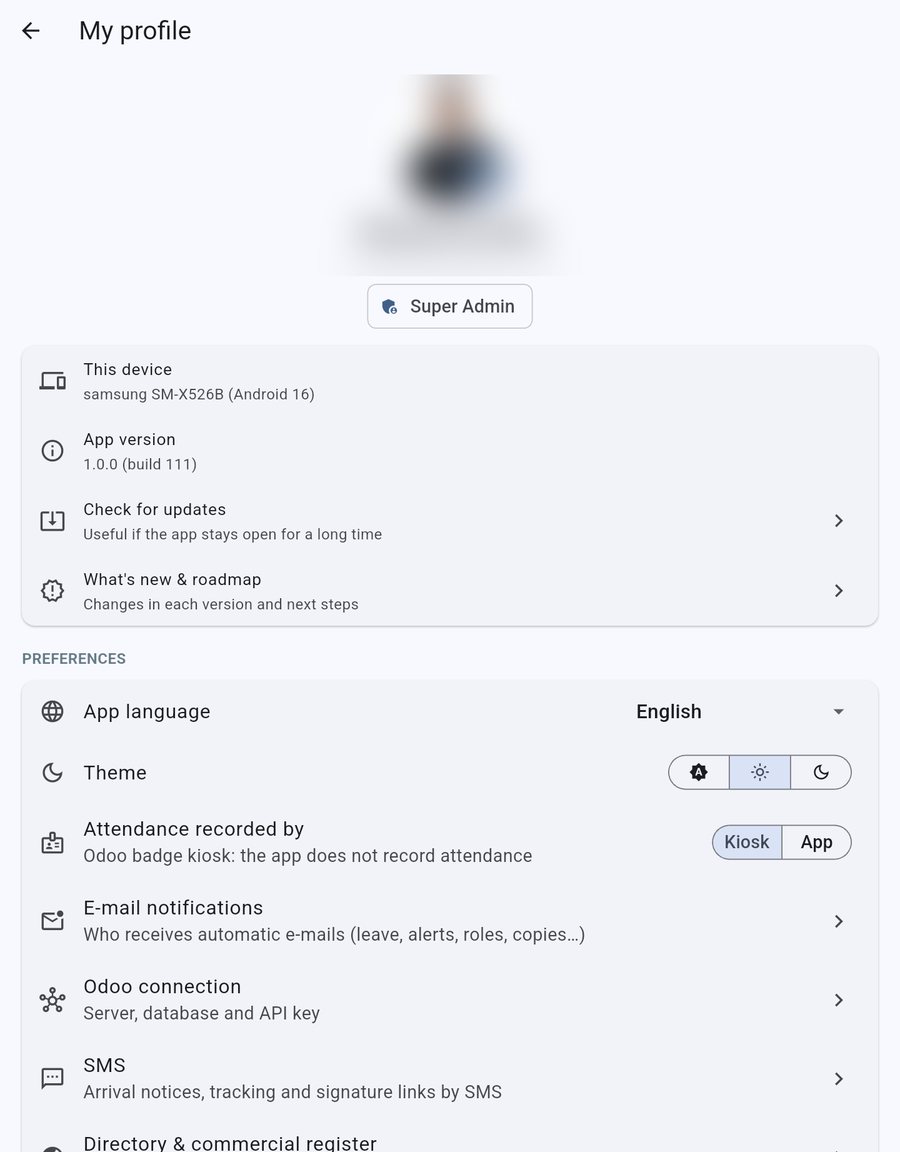
My profile page
My profilePhoto, language (English, French or Portuguese), theme, update check, what’s new and roadmap, preferences.
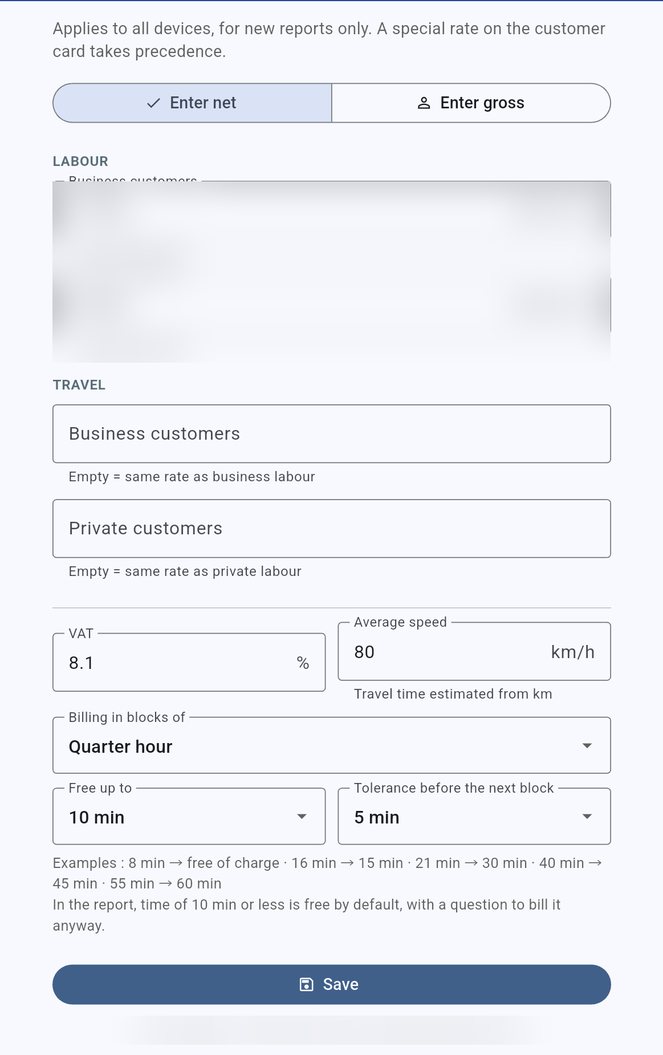
Rate and invoicing settings
Rates & invoicingBusiness, private and travel rates, net or gross; billing per quarter hour, free threshold and tolerance adjustable, no app update needed.
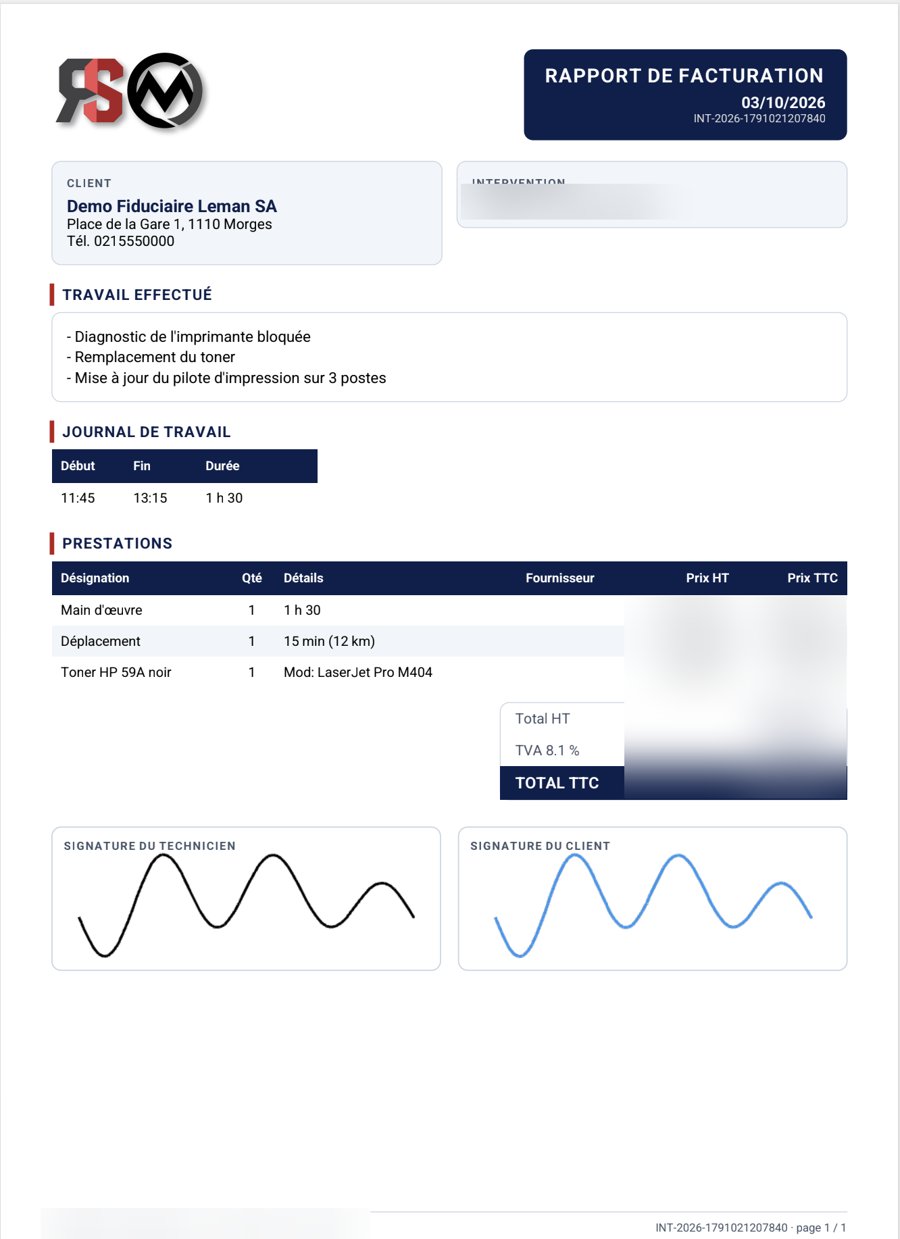
Generated PDF report
The PDF the customer receivesIn your branding, numbered, with itemised services and both signatures (shown here in French).
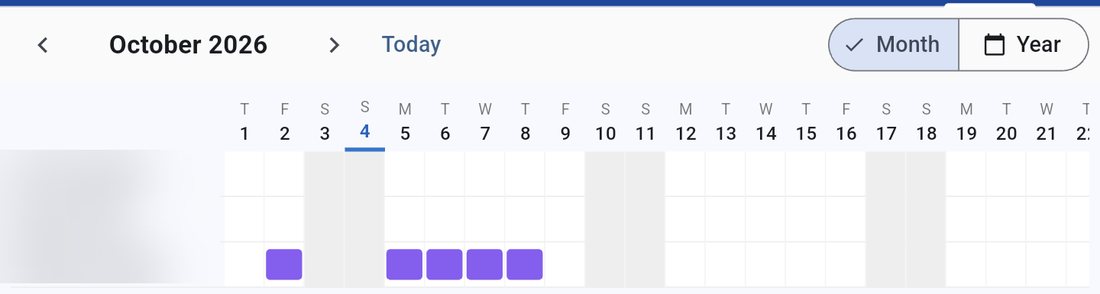
Team leave schedule
Absence scheduleMonthly or yearly team view, linked to leave approved in Odoo — without showing the reasons.
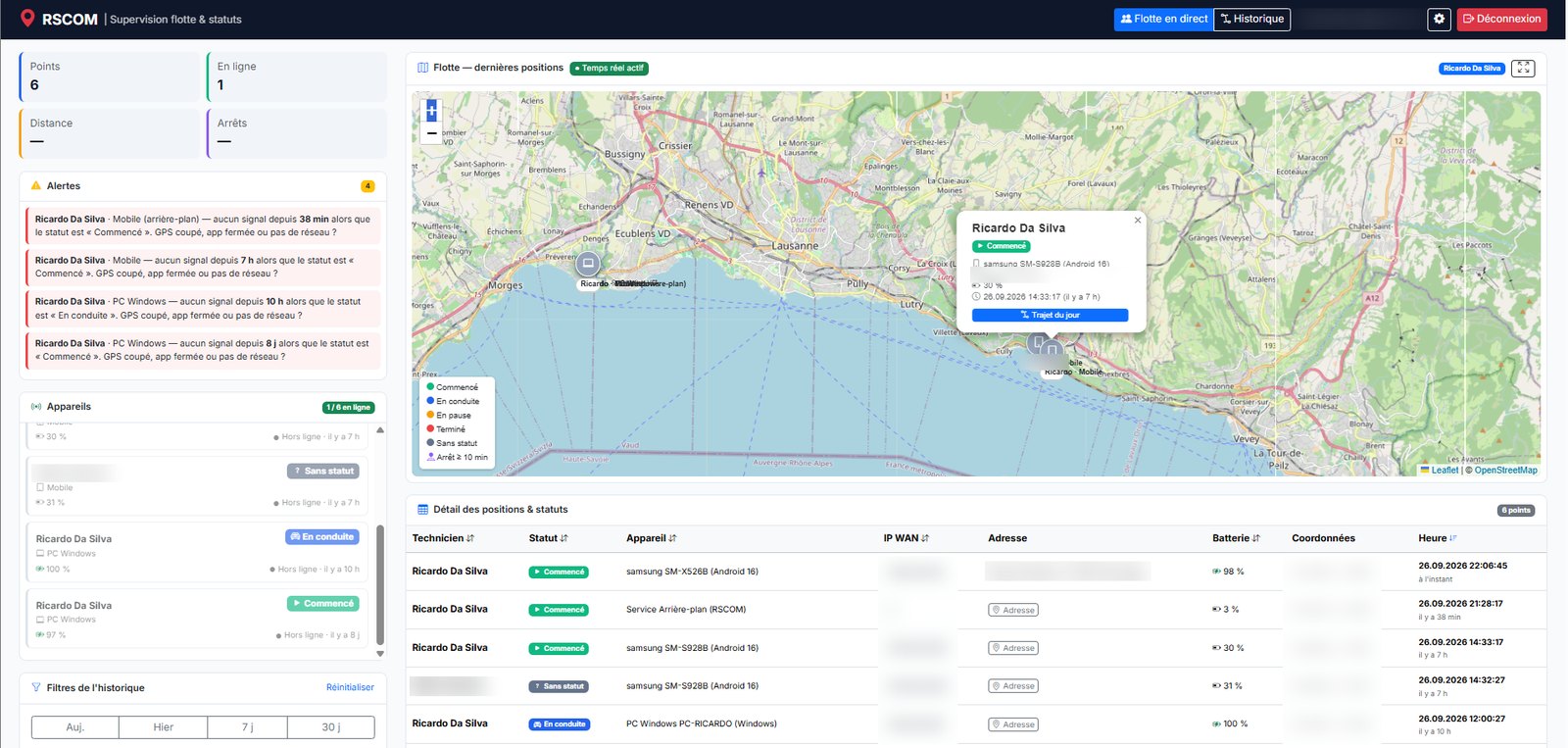
Live fleetLocation and status of every device, automatic alerts (signal lost during work, low battery), detailed card on click.
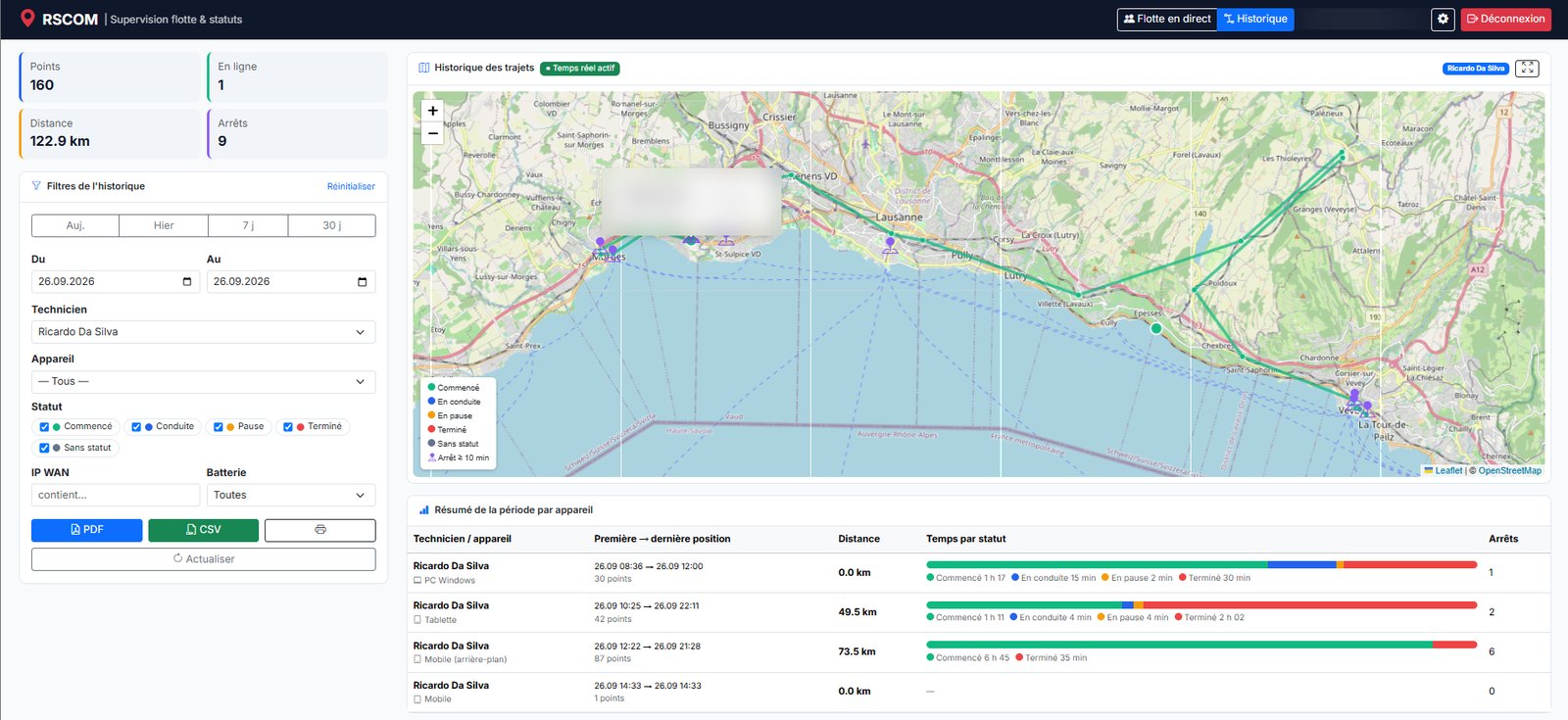
History & analysisTrips colour-coded by status, detected stops, distance travelled and time spent per status for each device — exportable to PDF or Excel.
Benefits

What's in it for you

Less data entry, fewer omissions, more visibility. Time saved on paperwork goes back to customers — and to invoicing.

Industries

IT servicesNetworks & telecomsTechnical maintenance ElectricalHeating / plumbingAlarms & security Facility managementCleaningAny mobile team
1

Complete, accurate invoicing

Work and travel time measured automatically: no more forgotten or estimated hours.

2

Reports sent before leaving the customer

Report tidied up by the AI, signed on the tablet, PDF emailed, task created in Odoo: no re-typing at the office.

3

Visibility over your teams

Who is where, with which status; trips, stops and time per status — to plan and respond quickly to emergencies.

4

Simpler HR

Automatic clock-in through statuses or badge, leave, balances and team schedule — everything lands in Odoo.

5

Security and compliance

Encrypted customer credentials, personal accounts, approved devices; location tracking limited to working time (Swiss data protection and labour law).

6

Controlled costs

Runs on existing hardware (Windows PCs, Android tablets) and is built on open technologies.

Security

Designed by an IT company, secured like one

Your customer data is your capital. Every layer of the app is protected — even a stolen device or a leaked password is not enough to get in.

🛡️

Server-side access control

  • Personal accounts, roles and permissions
  • Access rules in the database (RLS)
  • Stolen password without the code: no data accessible
📱

Approved devices

  • Every PC, tablet or browser must be approved
  • Instant revocation if lost or stolen
  • Maximum number of devices per account
🔑

Encryption

  • AES-256-GCM for customer secrets
  • Encrypted session on the device (DPAPI on Windows)
  • Mandatory two-factor authentication (6-digit code)
☁️

No keys in the app

  • ERP and email called through server functions
  • Keys stored in a server-side vault
  • 5 failed attempts: account locked and e-mail alert
⚖️

Privacy by design

  • GPS active only during work
  • Visible notification on the device
  • Viewing restricted to management, purged after 90 days
🧾

Traceability

  • Status, device and server time for every point
  • History of status changes
  • Exports for supporting evidence
💾

Backups

  • Automatic full backup every night
  • Off-site copy, hosted in Switzerland
  • Backup before every update
For your business

Tailored to your trade, deployed in a few days

RSCOM Interventions was born in the field: developed and used every day by RSCOM Sàrl for its own technicians. We adapt it to your business, your branding and your tools.

Analysis

Your service types, your reports, your invoicing rules and your existing tools.

Customisation

Logo, colours, PDF report template, trade-specific fields, statuses and email wording.

Deployment

Dedicated, secure environment, connection to your Odoo, your teams' accounts and devices.

Ongoing support

Technician training, automatic updates, support and new features.

🧩

Possible extensions

  • Contracts and prepaid hour banks
  • Connection to other invoicing software (Bexio…)
  • Telephony: calls recognised and linked to customers
  • iPhone / iPad and macOS versions
  • German interface
⚙️

Proven technologies

A single codebase for every platform, a managed PostgreSQL back end and a standard integration with Odoo.

FlutterDartSupabasePostgreSQLEdge FunctionsOdoo JSON-RPCAES-256-GCMLeaflet / OpenStreetMapswisstopo
RSCOM

Interested? Let's look at it together, on your real cases.

Free, no-obligation demo, by video call or at your premises. Pricing depends on the number of users and the level of customisation.

info@rscom.ch 📞 +41 21 519 21 27 💬 WhatsApp

RSCOM Sàrl · Switzerland · rscom.ch